
Click Here to Download
November 2026 Updates
General
-
Faster performance when adding plays to a template in both Visio & PowerPoint
- Sending a playbook or play data to Catapult Hub Pro is available to every Catapult account that has Integrations enabled, and needs Hub Pro 2.13.0 or later.
Bug Fixes
-
A playbook with damaged play data on one slot now opens normally instead of showing a data error every time you click.
-
Reset Numbering now works on a template page that has no plays, such as a cover or section page, instead of showing an error.
-
Adding a play to a slot no longer fails with "There is no active presentation" when another PowerPoint window, such as a Protected View file or a slide show, is in front.
-
The Playbook task pane now opens even when Visio or PowerPoint is low on graphics memory; the welcome page shows without its pictures instead of failing to load.
-
Hovering over a play now shows its picture even when that play is open in PowerPoint or Visio, instead of showing an error.
-
Adding plays with a template that has no room for a drawing now shows a clear message instead of an error, and no longer overwrites the title of the slot.
-
Adding a shape from the Play Editor library with Replace Shape on no longer fails with "Value does not fall within the expected range", and the line color and thickness are applied.
-
Clearing a slot in PowerPoint no longer shows an error when the slide thumbnails, the notes pane or Slide Sorter is active.
-
Adding plays from the Catapult integration with PFF diagrams no longer shows "Could not generate the drawing" for diagrams downloaded from PFF.
-
Downloading PFF play diagrams into a OneDrive folder is faster, and new plays are ready to use as soon as they download.
-
When PFF does not respond, the add-in now retries once and then shows a short "try again in a minute" message instead of an error report, once per import rather than once per play.
-
In the Catapult integration, a play is only marked as having its PFF diagram when the download actually succeeds.
-
Adding a shape or line with grouping turned on no longer fails when the selected player is part of a group.
-
Save Copy now works when the play is open in Visio or PowerPoint or still syncing to a cloud drive, and says who has it open when it cannot copy it.
-
A library rooted at Documents no longer shows My Videos, My Music and My Pictures, and a folder you do not have permission to open lists as empty with a warning instead of an error.
-
Adding a PowerPoint play whose slide has only a background picture to a page no longer fails with "The method or operation is not implemented".
-
Adding a Play Editor shape, line or shade onto a play title box in Visio no longer fails with "An exception occurred".
-
A Play Editor shape or drawings library file that is damaged or did not finish downloading now shows one clear message naming the file, instead of an error.
-
Exporting a page range that does not start at the first page, such as pages 5 to 8, now works and names each file after the right page.
-
A damaged or not fully downloaded play file now shows one clear message naming the file, instead of an error with a ticket button.
-
When the PFF play diagram folder cannot be created, for example on a shared drive without permission, Catapult now shows one message naming the folder instead of an error for each play.
-
A Play Editor drawing thumbnail that fails to render now shows a placeholder instead of an error message.
-
A Play Editor library that is on Google Drive or was moved now shows a warning naming the file instead of an error.
-
A play that PowerPoint refuses to open now shows one clear message that names the file and its cloud drive, instead of an error with a ticket button.
-
Editing a play from a synced SharePoint team library in Visio no longer freezes for minutes, and the slot now refreshes with your changes when you close the play.
-
In Visio, warnings such as "Invalid shape selected" now show after you have edited a play in its own window, instead of an error.
-
Exporting a Visio playbook that has a blank page no longer fails, and the blank page comes out as a blank slide.
-
Loading Catapult play data and folders now waits up to five minutes and shows a plain message, not an error, when Catapult does not respond.
-
Save As on a library play now keeps the play file type when the new name has a period in it, instead of failing with an error.
-
Flipping or refreshing a play on a Playbook slide now keeps the play data in its header instead of clearing everything but the number.
-
Importing a play list that keeps the formation, play and defensive call in separate columns now finds the right library files, and the AI check no longer hides a play the add-in already found.
-
Master Library matching now finds plays when the selected library is a folder inside another library.
-
Adding a play while OneDrive is not running now shows one warning that says to start OneDrive, instead of an error with a ticket prompt.
-
Adding a play to a Visio template no longer deletes border lines drawn on the template.
-
Hudl now opens on a team your account can use, instead of failing when Hudl will not open the first team's library.
-
With debug logging on, the Catapult folder right-click menu again shows Refresh, the My PQD Folder items and Import PFF Play Diagrams.
-
Importing play names from an Excel or CSV list no longer fails with "The handle is invalid" after the first presentation PowerPoint opened is closed.
-
Playbook no longer scans your whole play library when it starts, so Visio and PowerPoint stay responsive; the library index now exists only with the AI Playbook extension and is built the first time a feature needs it.
-
My Account, license activation and the ticket form no longer show an error or close PowerPoint when the licensing server is slow to answer; they wait longer, then say to try again in a minute.
-
Editing a play in a playbook whose folder is not synced to your PC no longer freezes Visio for about a minute per edit, and the add-in tells you which folder to sync.
-
Lines added from a Play Editor shape library no longer come in with a solid fill when Replace Shape is on.
-
Adding plays from a OneDrive or SharePoint library no longer uses up Visio's memory over a long session, in Visio or in PowerPoint, and an out-of-memory error now says to restart Visio.
-
Play Editor search now finds an item when every word you type is in its name, in any order, the way the Playbook play search does.
-
Opening a playbook from a SharePoint folder that was added to OneDrive as a shortcut no longer shows the "Playbook folder not synced" warning on the first play edit.
October 2026 Updates
What's New
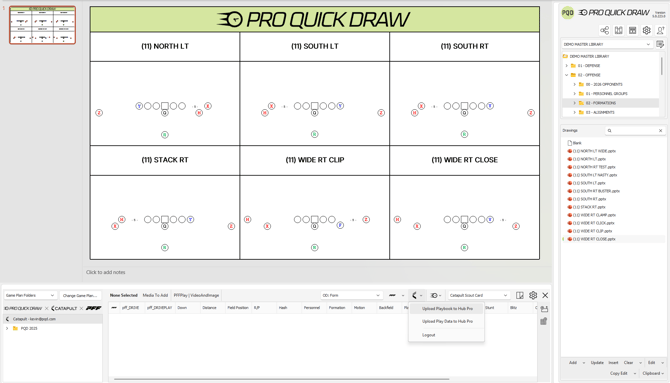
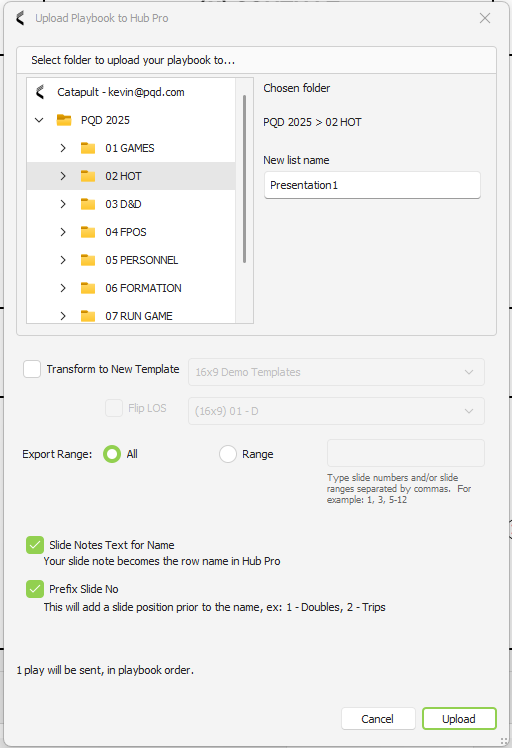
Catapult HubPro Export
Export your PQD playbooks — including drawings and video — straight to HubPro.
Important: Must have Catapult Integrations Package. If not sure, please contact your Account Owner.
New PFF Bulk Import Process
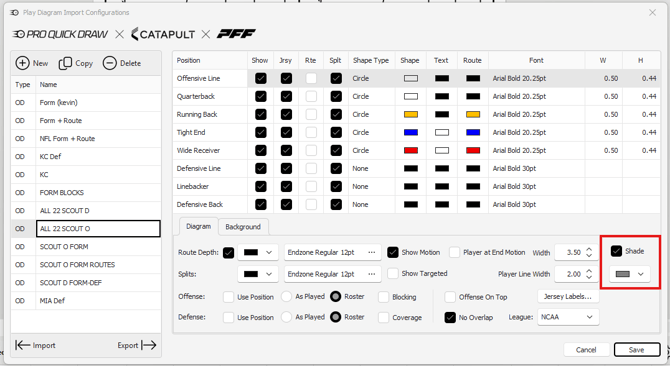
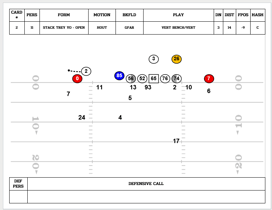
A new import engine speeds up PFF data imports. Also added: the ability to import shades for DL alignment on OL. Ability to Bulk Import plays from a cutup directly into an editing mode. This will carry the data from the imported play as well when adding to a template. Then export drawings directly into a Template.
Important: Must have Catapult Integrations Package. If not sure, please contact your Account Owner.
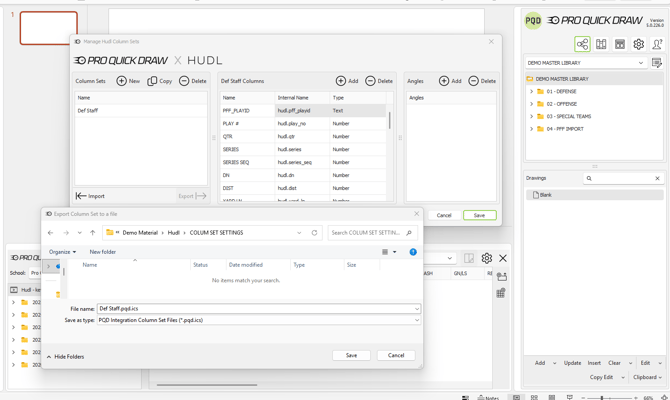
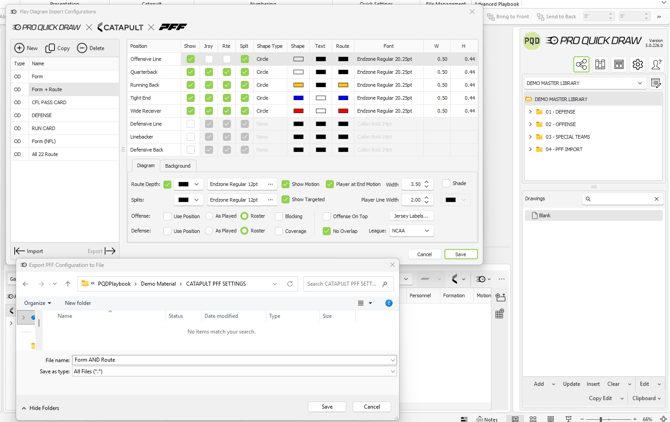
Import Export Catapult/PFF/Hudl/QwikCut Settings
Use an existing configuration set to export and then import to another machine. These are for:
-
- Catapult/PFF Integration
- PFF Mapping Configurations
- Catapult Library
- All Integrations
- Column Sets
- Catapult/PFF Integration
Important: Must have Catapult/Hudl/Qwik Cut Integrations Package. If not sure, please contact your Account Owner.
Playbook Manager
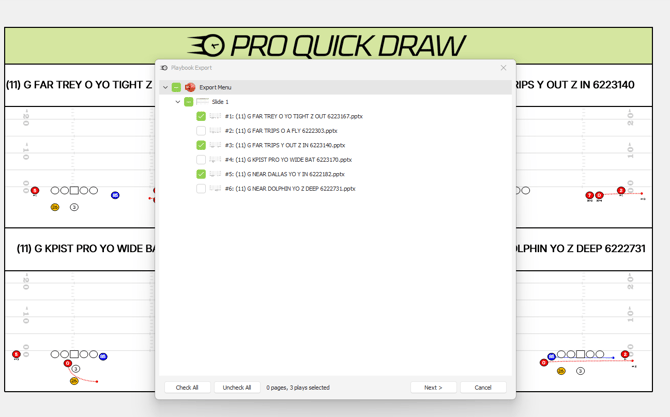
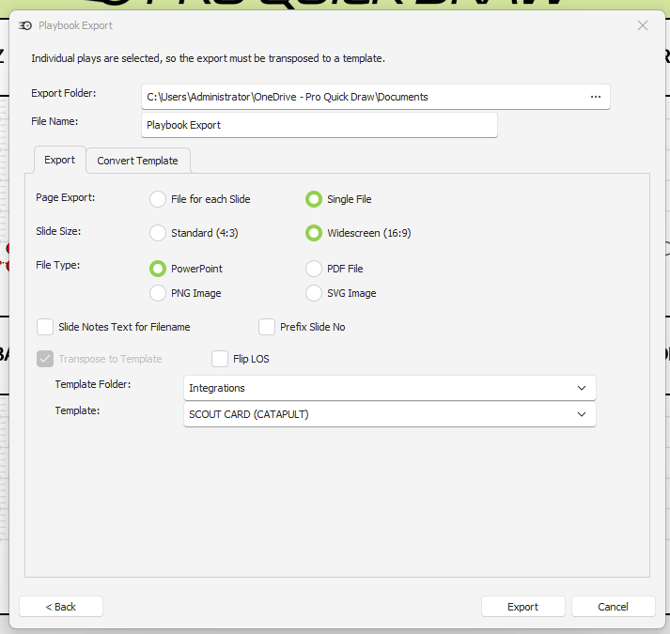
Build presentations and documents in an organized Tree View. Choose a template, add your files, and insert or update diagrams when your playbook changes. The new Export menu enables users to export individual slots to a new template or a PowerPoint Presentation.
Important: Must be an NFL/CFL/FBS Customer
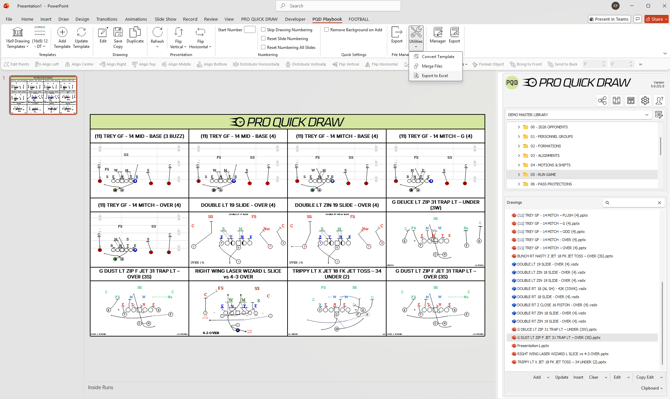
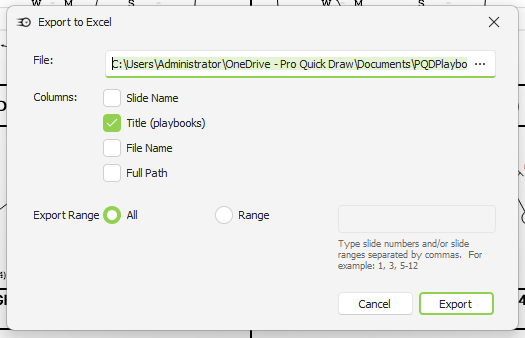
Export Play Titles to Excel
Select the pages and plays you need, then export their slot titles to an Excel spreadsheet. Build call sheets and practice scripts without retyping play names.
Merge Playbooks: Append Option
When merging playbooks, you can now choose to append the incoming document to your currently open playbook instead of replacing it.
Flip Visio Diagrams within PowerPoint
Insert a Visio Diagram into a PowerPoint template and be able to flip the diagram either vertically or horizontally.
More Details
Export to Excel
-
You can now export slot titles directly to an Excel spreadsheet — pick the pages and plays you want, and Pro Quick Draw will build the sheet for you. Great for building call sheets or practice scripts without retyping play names by hand.
HubPro Export
- Using the Catapult Integration within Visio or PowerPoint will enable users to send playbooks and/or video from PQD directly to Catapult HubPro.
- After creating a presentation, select the Catapult Icon within the Playlist menu at the bottom and select Upload Playbook or Playlist. This will create a new playlist after you have selected the output folder
New PFF Bulk Import Process
- Users can now Import PFF Diagrams at a higher speed along with a new workflow enabling a user to put the content directly into an edit mode by importing a playlist at once. This will drop the diagrams into individual slides or pages that enable a user to begin making edits without having the edit each individual drawing within a template.
- Users can then export each diagram using the Play Editor Export button to an output folder. When doing this, the Catapult Thunder Data will migrate with the play diagram then enabling a user to easily add their diagrams to templates in a much more efficient process.
Import Export Catapult/PFF/Hudl/QwikCut Settings
- Users can now export setting from their video integration program and use the files created to import for a new or existing user to have the same settings. This works for Column Sets, PFF Mappings and Catapult Library Settings.
Playbook Manager
- Users have the ability to create presentations or documents by way of a organized Tree View. Select your template, add/update and begin to add your files here. This enables a new method of adding diagrams to a file or even updating if you need to make a quick change.
- Select the Manager Button on the PQD Playbook Ribbon to enable this menu.
This is currently only available for our NFL/CFL/FBS Customers
Updated Export Menu
The updated Export button will enable users to select one or multiple slots to export either to PowerPoint or Convert to a new Template.
Import Shades on a PFF Drawing
Bug Fixes
- Fixed an error that could occur when selecting a template from the Select Template form.
- Fixed PowerPoint Play Editor's "Match Color" so it now matches on AutoShapes, not just visible text.
- Fixed a crash when editing a Visio playbook with no active template.
- Fixed an issue where the first drawing added to a page could be placed in the wrong spot.
- Fixed misaligned background images in Visio video exports.
- Added logging to help resolve cases where SharePoint couldn't locate a play.
- Fixed a duplicate-column error during Accel export.
- Fixed a crash in Visio when using "Flip Horizontal."
- Visio Play Editor exports now carry over metadata from Catapult correctly.
- Fixed Visio's flip-drawing behavior so it's based on the page, not individual shapes.
- Fixed an issue where Catapult PFF drawings from Visio weren't visible in PowerPoint.
- Fixed a crash when refreshing play data for Catapult PFF drawings in PowerPoint.
- Fixed Accel export so the Visio background now displays correctly in Accel templates.
- PFF imports now lock the background automatically during import.
- Fixed an issue in the Visio Template Editor that prevented changing a drawing's group number.
- Fixed incorrect sizing/scaling of routes in Visio SVG exports.
- Fixed a crash when exporting a blank Visio page to PNG.
- Fixed an out-of-memory crash during Accel hand-draw export.
- Fixed a HubPro issue preventing larger playbooks from uploading.
- Fixed an issue where angles weren't respected when adding plays to Media Images.
- Fixed an issue in Visio where editing a selected slot shape incorrectly showed "no slot shape selected."