---
title: How to Customize My Master Library Folders (Visio)
description: Learn how to set the location of my Master Library along with customizing the folder structure.
---
[Skip to content](https://help.proquickdraw.com/helpcenter/how-to-customize-my-master-library-folders-visio#main-content)
English
Show submenu for translations
[](https://www.proquickdraw.com?hsLang=en)
- [Homepage](http://www.proquickdraw.com/)
- [Customer Dashboard](https://dashboard.pqdcloud.com/)
Open main navigation
Close main navigation
- [Homepage](http://www.proquickdraw.com/)
- [Customer Dashboard](https://dashboard.pqdcloud.com/)
- English
Show submenu for translations
- [Contact Support](http://www.proquickdraw.com/contact-support)
[Contact Support](http://www.proquickdraw.com/contact-support?hsLang=en)
How Can We Help?
- There are no suggestions because the search field is empty.
1. [Help Center](https://help.proquickdraw.com/helpcenter?hsLang=en)
2. [Playbook (Visio)](https://help.proquickdraw.com/helpcenter/playbook-visio?hsLang=en)
3. [Building My Master Library](https://help.proquickdraw.com/helpcenter/playbook-visio?hsLang=en#building-my-master-library)
December 18, 2024
# How to Customize My Master Library Folders (Visio)
## Learn how to set the location of my Master Library along with customizing the folder structure.
**This video demonstrates how you can customize the organization of your drawings by modifying the folder structure and updating their titles.**
### **Where is my library located?**
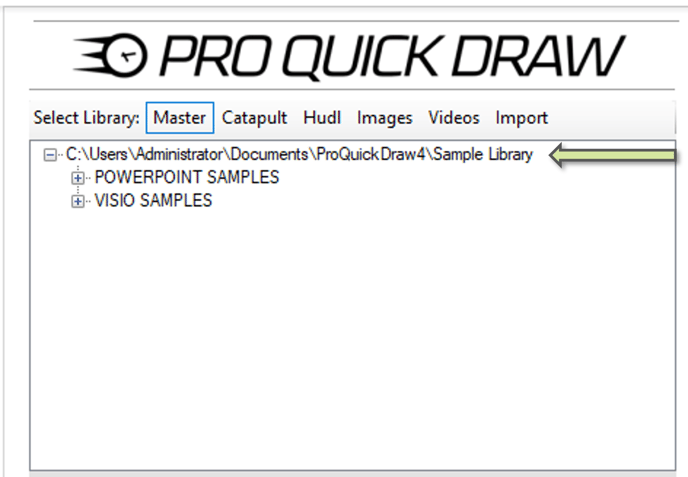
In order to see the location of your Master Library there are two location to view:
- Click **Toggle Panel**, and at the top of the Library Menu on the right side of my screen I will see the drive location
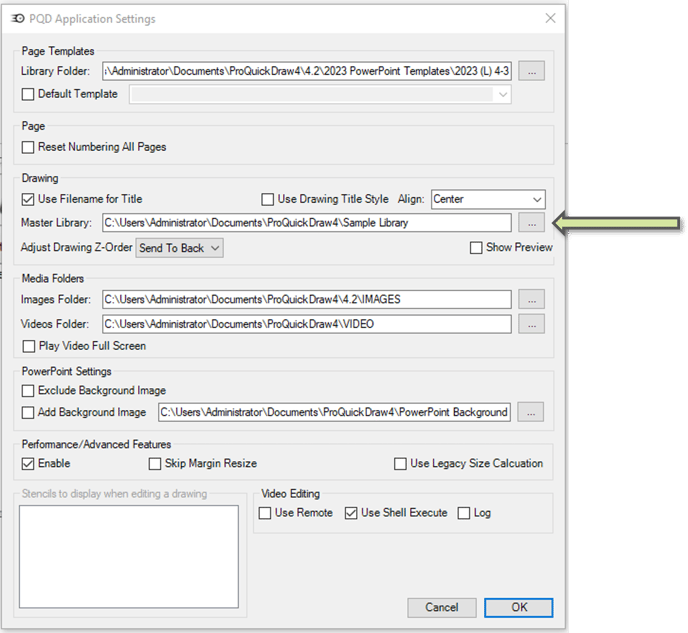
- Click the **Home** tab, and got to **Setting (gears)** on the top right of the ribbon
- Look for the section labeled **Master Library** and this will show you the folder path.
- Click the 3 dots to the right to change the location
### **How can I add/delete folder to my Master Library Folder?**
- Open your file explorer (manila envelop at the bottom of your screen)
- Navigate to the location of your Master Library
- Right Click the folder and select Rename
- Change the name of your folder and click ok
**‼️ Important ‼️** If you change the name of the Master Library folder, you will need to **update the folder location in your settings** to reflect the new name.
### **How can I add/delete folder to my Master Library Folder?**
- Open your file explorer (manila envelop at the bottom of your screen)
- Select the folder you want to remove, press the delete key or right click and select delete.
- To add folder right click and select New\>Folder
- Name your folder
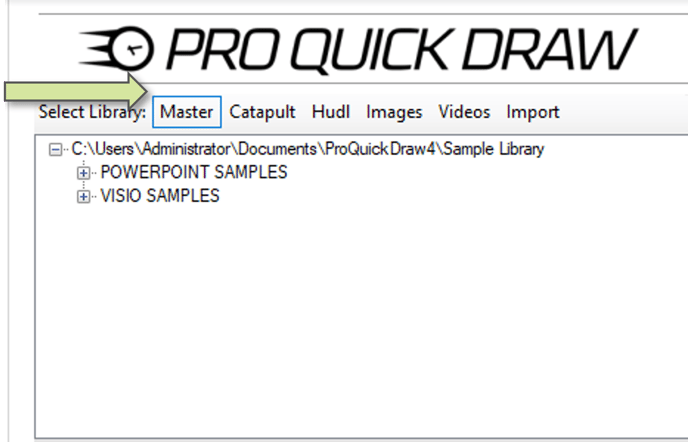
- When finished go back to Visio and Click the Master button on your library at the top to reload the folder structure without having to close and reload PQD
- [Account & Dashboard Setup](https://help.proquickdraw.com/helpcenter/account-dashboard-setup?hsLang=en#main-content)
- [Dashboard Management](https://help.proquickdraw.com/helpcenter/account-dashboard-setup?hsLang=en#dashboard-management)
- [Subscription Management](https://help.proquickdraw.com/helpcenter/account-dashboard-setup?hsLang=en#subscription-management)
- [Playbook (PowerPoint)](https://help.proquickdraw.com/helpcenter/playbook-powerpoint?hsLang=en#main-content)
- [Set Up Installation Packages](https://help.proquickdraw.com/helpcenter/playbook-powerpoint?hsLang=en#set-up-installation-packages)
- [Configure Your Libraries](https://help.proquickdraw.com/helpcenter/playbook-powerpoint?hsLang=en#configure-your-libraries)
- [Ribbon Bar Tools](https://help.proquickdraw.com/helpcenter/playbook-powerpoint?hsLang=en#ribbon-bar-tools)
- [Making Custom Templates](https://help.proquickdraw.com/helpcenter/playbook-powerpoint?hsLang=en#making-custom-templates)
- [Playbook (Mac)](https://help.proquickdraw.com/helpcenter/playbook-mac?hsLang=en#main-content)
- [Mac Version](https://help.proquickdraw.com/helpcenter/playbook-mac?hsLang=en#mac-version)
- [Playbook (Visio)](https://help.proquickdraw.com/helpcenter/playbook-visio?hsLang=en#main-content)
- [Getting Started](https://help.proquickdraw.com/helpcenter/playbook-visio?hsLang=en#getting-started)
- [Building My Master Library](https://help.proquickdraw.com/helpcenter/playbook-visio?hsLang=en#building-my-master-library)
- [Building My Template Library](https://help.proquickdraw.com/helpcenter/playbook-visio?hsLang=en#building-my-template-library)
- [Play Editor (PowerPoint)](https://help.proquickdraw.com/helpcenter/play-editor-powerpoint?hsLang=en)
- [Play Editor (Visio)](https://help.proquickdraw.com/helpcenter/play-editor-visio?hsLang=en)
- [Cutup Generator (Local Version)](https://help.proquickdraw.com/helpcenter/cutup-generator-local-version?hsLang=en)
- [Cutup Generator (Web Version)](https://help.proquickdraw.com/helpcenter/cutup-generator-web-version?hsLang=en#main-content)
- [Initial Setup and Getting Started](https://help.proquickdraw.com/helpcenter/cutup-generator-web-version?hsLang=en#initial-setup-and-getting-started)
- [Integrating Your Video Platform](https://help.proquickdraw.com/helpcenter/cutup-generator-web-version?hsLang=en#integrating-your-video-platform)
- [Projects](https://help.proquickdraw.com/helpcenter/cutup-generator-web-version?hsLang=en#projects)
- [Cutup Definitions](https://help.proquickdraw.com/helpcenter/cutup-generator-web-version?hsLang=en#cutup-definitions)
- [Column Sets](https://help.proquickdraw.com/helpcenter/cutup-generator-web-version?hsLang=en#column-sets)
- [Folder Rules](https://help.proquickdraw.com/helpcenter/cutup-generator-web-version?hsLang=en#folder-rules)
- [Filters](https://help.proquickdraw.com/helpcenter/cutup-generator-web-version?hsLang=en#filters)
- [Sort Rules](https://help.proquickdraw.com/helpcenter/cutup-generator-web-version?hsLang=en#sort-rules)
- [Working the Grid](https://help.proquickdraw.com/helpcenter/cutup-generator-web-version?hsLang=en#working-the-grid)
- [Watching Video](https://help.proquickdraw.com/helpcenter/cutup-generator-web-version?hsLang=en#watching-video)
- [AdHoc Playlists](https://help.proquickdraw.com/helpcenter/cutup-generator-web-version?hsLang=en#adhoc-playlists)
- [Title Slides](https://help.proquickdraw.com/helpcenter/cutup-generator-web-version?hsLang=en#title-slides)
- [Charts and Stats](https://help.proquickdraw.com/helpcenter/cutup-generator-web-version?hsLang=en#charts-and-stats)
- [Settings and Troubleshooting](https://help.proquickdraw.com/helpcenter/cutup-generator-web-version?hsLang=en#settings-and-troubleshooting)
- [Accel](https://help.proquickdraw.com/helpcenter/accel?hsLang=en)
- [Catapult Integration](https://help.proquickdraw.com/helpcenter/catapult-integration?hsLang=en)
- [Hudl Integration](https://help.proquickdraw.com/helpcenter/hudl-integration?hsLang=en)
- [Qwikcut Integration](https://help.proquickdraw.com/helpcenter/qwikcut-integration?hsLang=en)
- [GoArmy Edge Integration](https://help.proquickdraw.com/helpcenter/goarmy-edge-integration?hsLang=en)
- [GoRout Integration](https://help.proquickdraw.com/helpcenter/gorout-integration?hsLang=en)
- [Troubleshooting & FAQs](https://help.proquickdraw.com/helpcenter/troubleshooting-faqs?hsLang=en#main-content)
- [Download & Installation](https://help.proquickdraw.com/helpcenter/troubleshooting-faqs?hsLang=en#download-installation)
- [Templates](https://help.proquickdraw.com/helpcenter/troubleshooting-faqs?hsLang=en#templates)
- [Master Library](https://help.proquickdraw.com/helpcenter/troubleshooting-faqs?hsLang=en#master-library)
- [Formatting](https://help.proquickdraw.com/helpcenter/troubleshooting-faqs?hsLang=en#formatting)
- [Integrations](https://help.proquickdraw.com/helpcenter/troubleshooting-faqs?hsLang=en#integrations)
- [Release Notes](https://help.proquickdraw.com/helpcenter/release-notes?hsLang=en)
[](https://WWW.PROQUICKDRAW.COM)
Copyright © 2026, Pro Quick Draw
Follow us on Social Channels for important announcements and workflow ideas.
Cookie Settings